
Use Notion to build your creative career
If there’s one thing working at a startup taught me, it’s how to work under pressure and meet my deadlines.
There were no long, stretched-out projects where I could slowly figure things out. Most things had to be done within a few weeks, sometimes even days. It was intense, sometimes chaotic, but in a weird way it worked really well with my AuDHD brain. There wasn’t much space for overthinking or endless tweaking.
I often was the only designer, which meant I also had to be my own project manager. I had to learn how to break things down, assign priorities, and make a progress even when I didn’t feel like I had everything figured out.
Building a system that helps you see your progress
Building a plan is where things start to feel a bit more real because you’re no longer just thinking about what you want to do. You’ve made some decisions and you’re choosing the direction you want to take.
But! There’s still one piece missing. Because having a plan and actually working through it day by day are two very different things.
Don’t just plan, act
You know, because when it comes to ideas, I’ve always been… well, great at them.
Coming up with plans, new directions, new projects, new versions of myself, I really can’t say that part was ever the problem. Execution was, however.
Before that job, I would make these big, ambitious plans and then… not really follow through. Or I would spend weeks tweaking details that didn’t matter, changing direction halfway through, or looking for better and better solutions.
“I want to open an online shop” sounds like a plan, but it’s actually just a thought. It’s too vague to act on, so instead of moving forward, I’d just procrastinate by researching platforms, adjusting budgets, or rethinking the products.
What changed over time was realizing that making a decision is only the beginning. You have to write down the steps, choose a deadline… and then you need something that helps you keep going. Because a plan, even a good one, doesn’t run itself.
The Scaffolding
Understanding that I don’t just need ideas but a system (and learn how to build one!) was the biggest shift for me.
In my head, I think of it as scaffolding. Not something rigid or restrictive, just flexible enough that keeps everything in place. Especially on the days when my brain goes off in ten different directions (which happens more often than I’d like to admit).
That kind of brain is great when it comes to ideas, but it’s not so helpful when you’re trying to finish something. Ideas left on their own, just float around in my head, competing for attention. And whichever one feels the most interesting in the moment wins (not necessarily the one that actually moves things forward).
The only way I’ve found to not completely drift off every time is to have a system I can come back to. It’s something I open before I start working, not just to see what I could do, but to remind myself of the direction I chose earlier, when I was thinking a bit more clearly.
Stay on track
What this changed for me wasn’t that I suddenly became more organized or disciplined, that’s not really the point.
But I did learn how to choose a goal, break my ideas into a list of tasks, and track my progress. All those projects that used to live as ideas, notes, or half-finished plans finally got to the point where I could call them… done. Or at least done enough to share and move on.
And I think that’s the part that matters the most if you’re trying to build a creative career: it’s not having the best ideas, but having a system that helps you turn those ideas into reality.
Yearly and weekly planners
At some point I started building a system to guide me when I wasn’t sure what to work on. And this is where tools like Notion save me. Not because I’m a productivity nerd (I’m really not), but because I needed a place to catch ideas, tasks, plans, notes before they all disappear.
After months of tweaking, I turned it into a planner I now use every day.
This is what it looks like:
Some days I sit down and I genuinely don’t know what to do first, so having clear priorities for the week helps.
Other times I get new ideas in the middle of working on something else. Before, that would completely derail me, now I just drop them in my Notion doc and come back later.
And then there are days when I switch between things constantly. A bit of Substack writing, a bit of Instagram content, a bit of something else, and by the end of the week it feels like nothing really happened. Being able to see things in context, grouped by project or platform, allows me to look back at the end of the week and see real progress. This is especially helpful when I look back at the whole month and see the amount of work I’ve done in one place.
Call to Adventure, as the wise Andy J. Pizza says:
Sit down next Monday (or Sunday evening) and build a weekly plan. Choose one goal, maybe updating your website?
Start by writing down everything you think needs to happen. Then take a step back and trim that list down to what actually fits into one week.
And, hey, start simple first. A few clear tasks are better than an ambitious list you won’t return to. Don’t aim for a perfect system and don’t create an endless list of thigns to do.
Building a really good system takes time and can only happen through trial and error. That’s part of the process! This exercise is all about taking that first step.
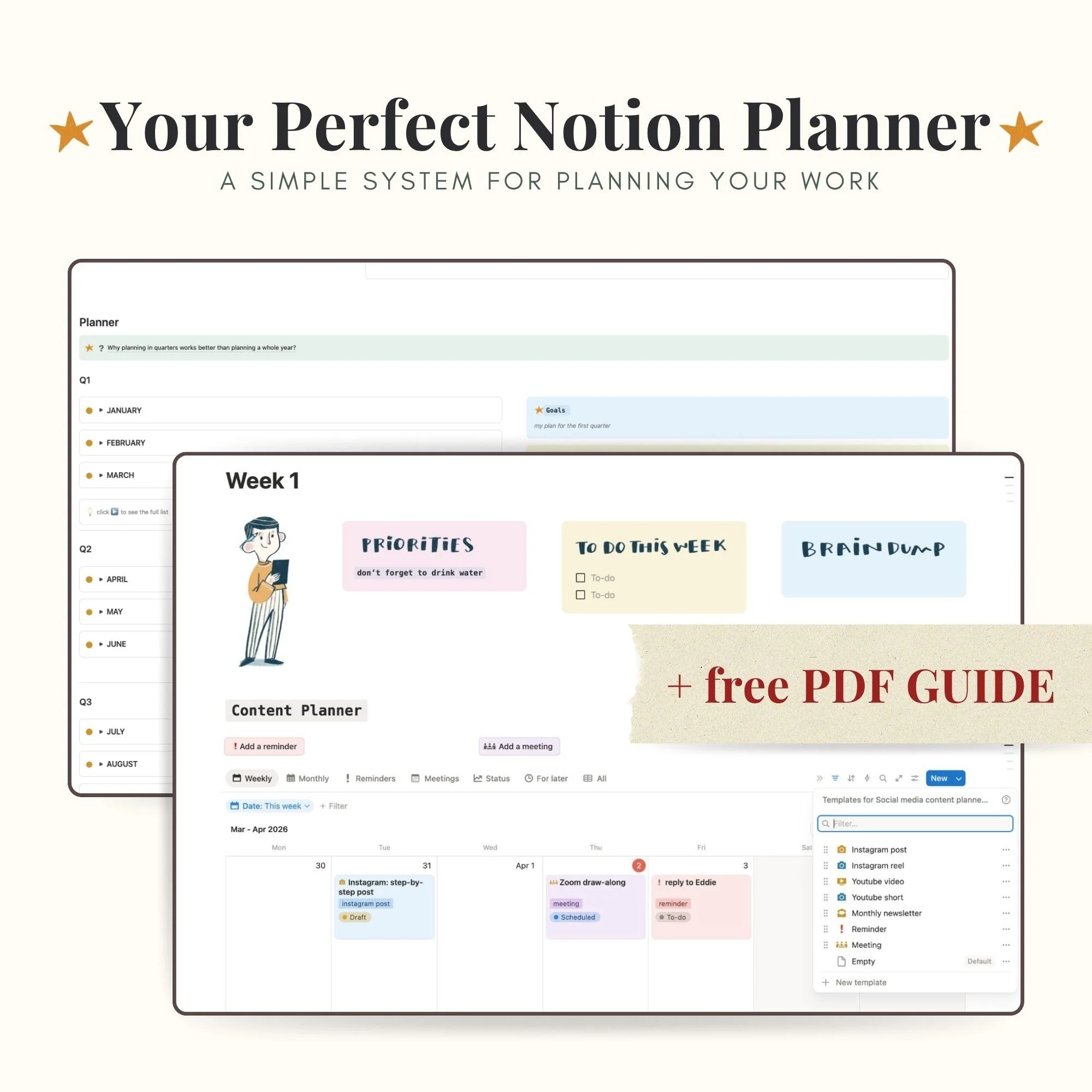
Use a piece of paper, a whiteboard or if you’re curious about Notion, I’ve turned my planner into a downloadable template you can get in my shop.
Who this is for
This will probably work well for you if:
– you’re an artist or creative trying to stay consistent
– you like having some structure, but not too much
– you want something that supports your work, not controls it
What this planner helps you do:
Instead of juggling ideas, tasks, and plans in your head (or across five different apps), this gives you one place to:
– plan your current quarter without overthinking it
– organize your weekly and monthly content
– break bigger goals into smaller, doable steps using the Creative Roadmap template
– keep track of ideas for later (without losing them)
What’s inside
The planner is built around sections that work together:
Quarter planning
A place to map out what you want to focus on over the next three months
Weekly planner
With your day-to-day and where things actually get done
Priority and to-do list system
Flexible enough to move things around when plans change (because they will)
Future ideas
For all the “not now, but later” thoughts
Creative Roadmap by Milena Milak
A stand-alone template where you can plan your projects, bigger and small
Free PDF guide included
If Notion ever felt confusing or overwhelming, this part is for you!
You’ll also get a step-by-step PDF guide that walks you through:
– how to set up the planner
– how to use each section
– how to use the quarterly planning system
Do you use a system? What’s your tool of choice? Are you a fan of good old pen and paper, or do you prefer digital tools?
Let me know if you have any questions. And if you try the template, I’d love to hear how it works for you!
Until next time,
Mila